AI Agents: What Do They Do? Do They Do Things? Let’s Find Out
By Bhavesh Amin on 15 January 2026
While we’ve recently seen the impact of AI on Hollywood (also known as Hollywoo in the Bojack multiverse) with AI-generated actor Tilly Norwood (not to mention the ability of LLMs to write derivative screenplays. I’m assuming they are derivative as they are based on previous literary works), a dramatic change has already started in other industries. The biggest impact for most of us is likely to come from agentic AI.
Agentic AI is a semi-autonomous system that uses LLMs, instructions, data, and tools to implement a workflow. An agent combines a prompt, an LLM, and tools to carry out a particular task (defined by the prompt), making decisions and taking actions to achieve the user’s goal. A workflow can utilise multiple agents, working together to accomplish particular tasks.
A comparison of a non-agentic and agentic process is as follows:
- Non-agentic code assistance: I request an LLM to write Python code for my project and run/debug the code yourself.
- Agentic AI code assistance: I assign PythonREPLTool and GoogleSerperAPIWrapper from LangChain to LLM agents and ask them to write code that runs and produces the desired output.
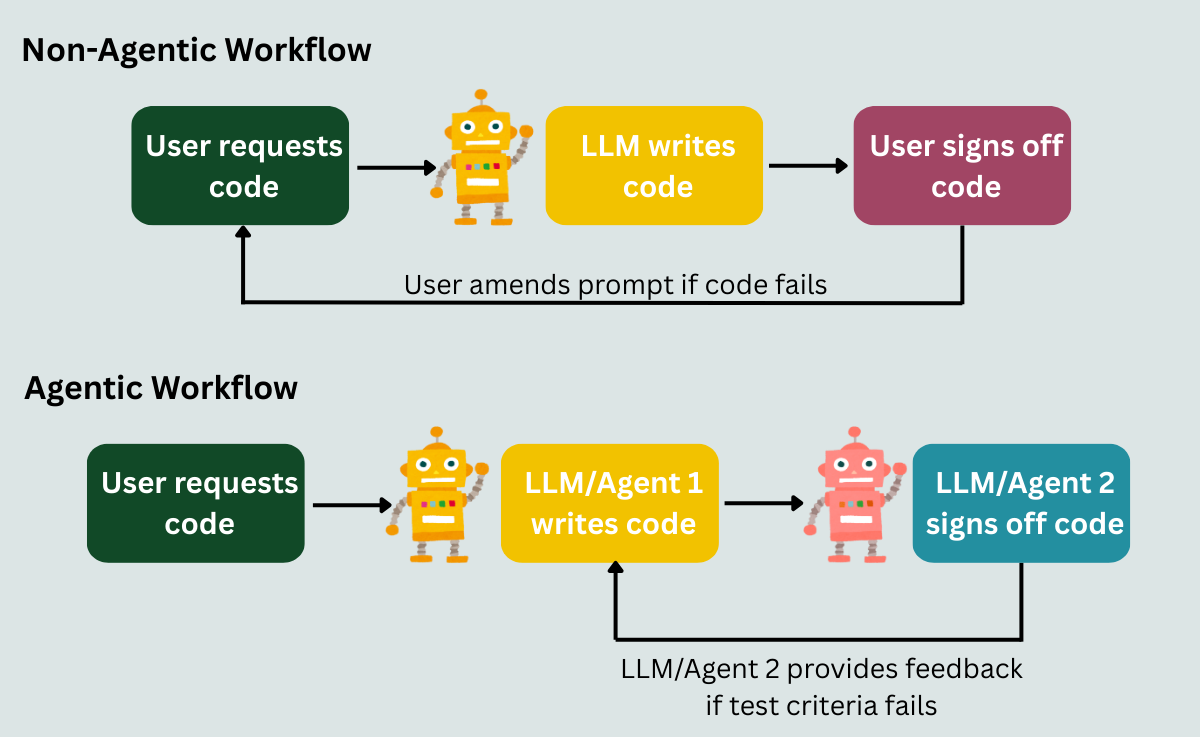
Figure 1: A comparison of a non-agentic and agentic workflow
In the first (non-agentic) workflow, the LLM writes some code based on my request, but I have to run and debug the code. This can be frustrating if the code doesn’t run or produces an incorrect output.
In the second (agentic) workflow, I assign an agent to write the code and a second agent to run the code and provide feedback to the first agent if the code doesn’t run or doesn’t produce the desired outcome. I can assign GoogleSerperAPIWrapper to both agents with a prompt to get the latest Python library versions from the internet. The second tester agent can use a tool like PythonREPLTool to run the code. You can also ask it to create several test cases to run and sign off on or provide feedback to the first agent based on the test cases, which in turn will amend the code based on the feedback.
**Sidebar** In this example, you will need to make sure the agents run in a secure sandboxed environment with the principle of least privileges to keep the code testing isolated and minimise the risk of the agent amending programs, filesystems, or data they shouldn’t have access to. Also, you may want to limit the number of feedback loops, as I did have a situation where the coder agent fixated on using a deprecated library. Perhaps I needed a more effective prompt for my first agent. Additionally, you can add a document with links to library documentation. This is something learnt from Cursor (or you could just use Cursor for your vibe coding).
The second example is agentic because the system autonomously creates and tests the code until it has met the test criteria.
What are tools?
In the previous example, I mentioned 2 tools: GoogleSerperAPIWrapper to search the internet and PythonREPLTool to run Python code. Tools are integrations that the LLM can utilise to perform specific tasks. Some tools connect with the APIs of different software and allow the LLM to execute actions using the software based on criteria set by the prompt. Note that the AI agent’s capabilities are limited to what the APIs allow users to do with the software.
You can create custom tools by setting up a call to their APIs and structured outputs in JSON format for the LLM to use when invoking the API. The structured outputs represent a schema for the LLM to format its request so the API can understand it.
A whole world of tools
There are thousands of prebuilt integrations available to users across frameworks like LangChain, Model Context Protocol (MCP) servers, and no-code automation providers, such as n8n, Make, and Zapier. MCP is a protocol that applies a consistent structure for how tools and LLMs communicate with each other. It standardises and simplifies tool integration. Via MCP servers, you can expose tools through a standardised protocol, which have been packaged and can be run locally or remotely. More details can be found here: https://modelcontextprotocol.io/docs/getting-started/intro
Many tools are built by community members (the no-code platforms probably have a greater percentage of tools built by companies that provide the software), so it is important to research the tools before bringing them into a live system. Checking the performance and security of the tools, their GitHub pages, and researching user feedback can help with your decision-making. Are the tools actively maintained? What are the issue response times like? The website Glama also provides security, license, and quality scores for the MCP servers hosted on their website.
Opening up APIs
For a lot of UI based software, providing access to the software’s API was usually limited to a handful of tasks, as the software provider was making the users’ lives easier by providing an easy-to-use user interface. This is likely to change. If a horde of AI agents can implement a large chunk of the process intended for the human worker, then they don’t need a user interface to do so.
Companies will not only look for AI automation on the UI side when choosing a software provider, but also the API functionality offered by the software providers and whether the software provider has their own prebuilt AI tool or MCP server. While users can implement tools like Playwright to allow agents to interact with online platforms (via clicking and inputting functionality), they can introduce significant security risks, especially where login credentials are exposed. People will want an easier, more consistent, and safer way for their agents to communicate with the software, making API functionality important in the decision-making process of choosing relevant software for their company. This, in turn, also causes security and platform performance concerns for software providers. While now there may be hundreds of employees per company interacting with their software via the UI or API each day, in the future, they could have thousands of agents per company interacting with their software. The software providers could have their own team of agents monitoring what the external agents are doing and removing agents doing things they shouldn’t be doing or getting stuck in a loop.
There will have to be a balance between opening up APIs and the cybersecurity risks and additional load on software providers’ systems, since each exposed endpoint increases the system’s attack surface and can add additional processing load on providers’ infrastructure.
What’s next for companies?
Companies have already started investigating where generative and agentic AI can save costs and free up time for their teams, as well as how to use AI for innovation. Company guidelines on AI usage will depend on its philosophy on growth, employee considerations, expenses, privacy, security, impact on its brand, and legal considerations.
There are internal and external customers for whom agentic AI will provide benefits. There may be a tendency to focus on external customers first, as it’s easier to define success metrics and see the impact of the product improvement. This may not be the best strategy, especially if your company is new to using LLMs. I recently bought 3 items from a company. They charged me for all 3 items, but sent an email listing only 1 item. I forwarded the email to the company’s customer service team, mentioning I should receive 3 items and got a response saying they couldn’t find my order number and could I provide my address. Still unaware I was dealing with a bot (I probably should have clocked this earlier), I copied the order number from the subject line of my email and my address from the email chain and replied to the customer service email address. The big reveal was that I was communicating with a chatbot (it still mentioned that it couldn’t find my order), and it had notified a human to look into my query.
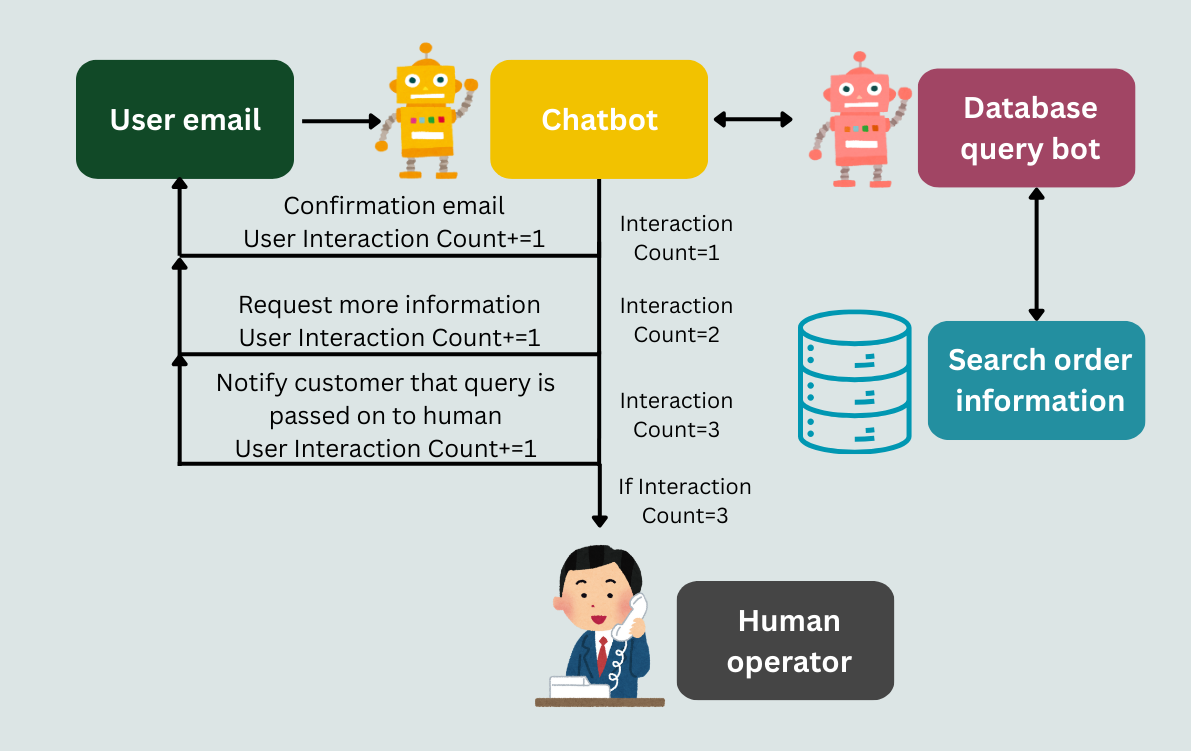
Figure 2: An example of a chatbot/email bot workflow
This is an example of a company using an agentic workflow for its first-line email enquiries that uses a tool to email the user and another query tool to find order information from their sales database to save employee time or costs. While you can argue that the query would have always had to go to a human representative because of its complexity, the chatbot (workflow) couldn’t find my order twice. As a customer, this caused some anxiety as I saw the money leave my account, but I was either receiving 1 or 0 items instead of 3. I considered looking for the products elsewhere or finding an alternative.
That’s why, in my opinion, if your company is new to LLMs, then focusing on internal customers (your colleagues) might be a better strategy to help you test and learn with more freedom. You could build agentic workflows that work side-by-side with existing workflows to monitor differences. Also, a colleague belittling your first agentic workflow is not as bad as losing customers over it.
Final thoughts
Agentic AI is the next big disruptor in the workplace, with all the concerns and opportunities people had with the introduction of the internet being exacerbated by agents' ability to replicate human-involved workflows with software. LLMs and tools will improve over time, as will the ease of implementing agentic workflows. Powerful no-code platforms already exist, and agentic frameworks like CrewAI and the data, filesystem, and web-focused PandasAGI are light on the code you have to write.
Numerous products and workflows can be improved with the use of LLMs and tools. You just need a good product manager and an AI team to discover the best opportunities for your company. In conclusion, AI agents are autonomous workflows driven by LLMs working with a suite of tools. And yes, they do do things.